

Client reporting is a critical part of the grant management lifecycle. It enables funders and program managers to understand how projects are progressing, whether milestones are being achieved, and how funds are being used.
However, traditional reporting processes are often manual, fragmented and time‑consuming – driving up administration costs and creating delays. Enquire’s client reporting functionality is designed to simplify this process, reduce administrative effort and give grant project managers clear, timely visibility into project performance.
This article explains how client reporting works in Enquire and how it helps organisations streamline reporting while maintaining accuracy and accountability.
Why client reporting matters in grant management
Reporting provides funders with essential updates on:
- Project progress
- Milestone completion
- Expenditure and costs
At the same time, program and grant managers rely on reports to compare planned versus actual data, identify risks early and ensure projects remain on track.
When reporting is managed through disparate forms, spreadsheets or emails, it increases duplication, manual handling and the likelihood of errors. Enquire addresses this by embedding client reporting directly into the grant record.
How Enquire reduces administration costs
Enquire’s report forms are easy to use and tightly integrated with grant records. Once a report is approved, the reported data automatically updates the grant record – eliminating the need for re‑keying information and reducing administration overhead.
This approach allows program managers to:
- See planned data versus actual results in one place
- Track remaining totals and outstanding milestones
- Maintain a single source of truth for reporting and grant data
The result is faster reporting cycles, improved data accuracy and lower administrative costs.
Watch a video demonstrating Enquire’s client reporting functionality below
Client reporting in three simple steps
With Enquire, you can create, send and review client reports in just three steps.
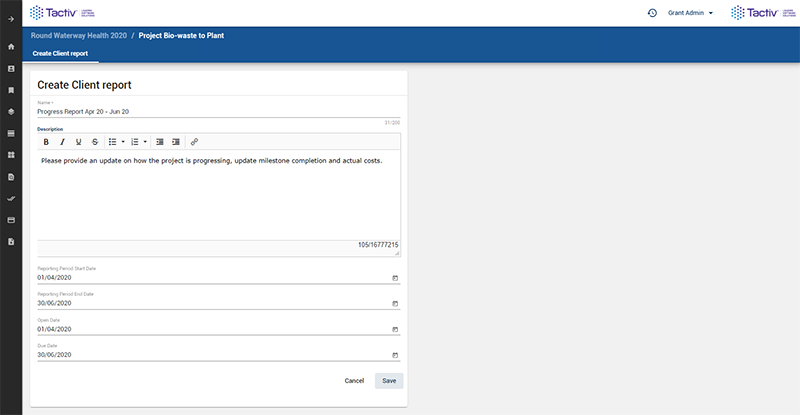
Step 1: Create and send the report
Grant administrators create the report by:
- Selecting the appropriate report form
- Setting the reporting start and end dates
- Sending the report to the grantee
This ensures consistent reporting requirements across projects and funding rounds.
Step 2: Grantee completes and submits the client report
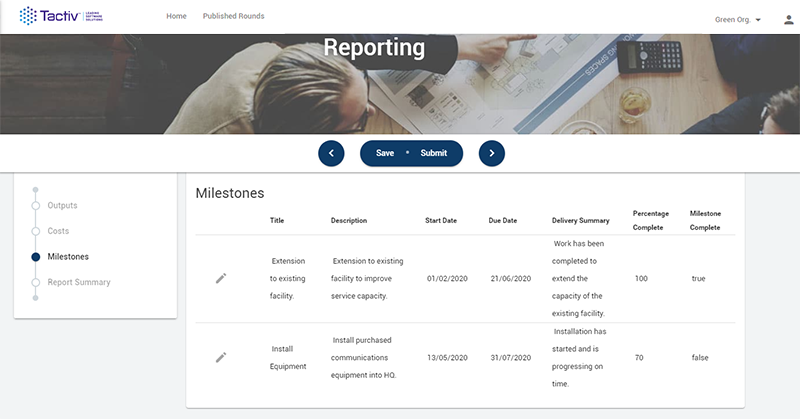
Once the report is issued, the grantee receives a notification advising them that a report is ready to complete in Enquire.
The grantee can:
- Log in at a time that suits them
- Complete the report online
- Submit the report directly through the system
This reduces back‑and‑forth communication and avoids the need for external forms or attachments.
Step 3: Review and accept the client report
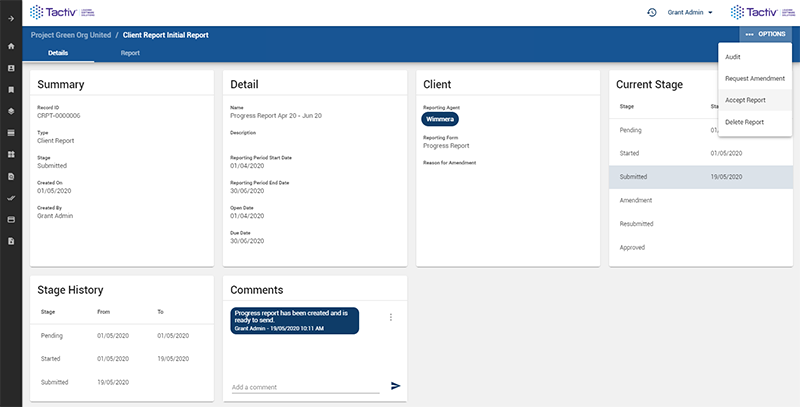
After submission, grant administrators can:
- Review the reported information
- Approve the report, or
- Send it back to the grantee for amendment if required
Once a report is accepted, the grant record is automatically updated with the reported data – saving time and ensuring consistency across reporting, milestones and financial tracking.
Improved visibility and control
By using Enquire’s client reporting functionality, grant project managers can quickly review:
- The progress of clients’ projects
- How milestones are being achieved
- Whether reported results align with planned outcomes
This visibility supports better decision‑making, stronger oversight and more efficient program management.
How To Manage Client Reporting in Enquire
Improve your client reporting with Enquire today
Effective client reporting should support transparency and accountability without adding unnecessary administrative burden. By embedding reporting directly into the grant lifecycle, Enquire helps organisations reduce grant administration costs while improving the quality and timeliness of reporting.
If you are a grant manager and would like to learn more about how client reporting works in Enquire, contact us today.