
How to Choose Grant and Scholarship Management Software for University Impact Reporting
17th June 2026
5 min read
by Taru Bhargav

Let's compare grant and scholarship management software for university workflows, impact reporting and lifecycle management.
Key insights
- Grant and scholarship management software helps universities manage the full funding lifecycle, from applications, eligibility and assessment through to awards, acquittals, reporting and outcomes tracking.
- Universities usually outgrow manual grant and scholarship processes when spreadsheets, inboxes and generic tools can no longer support multiple stakeholders, workflows or reporting obligations.
- The strongest systems support the full lifecycle, from application intake through to assessment, award administration, acquittals, impact reporting and long-term outcomes tracking.
- Research offices and scholarship teams should compare software based on configurability, lifecycle coverage, reporting depth, stakeholder access, integrations and implementation support.
- A fit-for-purpose platform is most valuable when the institution needs consistency across multiple programs, faculties, funders or award types.
You may have already searched for grant and scholarship management software and found the options hard to compare. The noise gets confusing quickly, especially when every platform promises better workflows, easier reporting, and more visibility.
Universities often manage research grants, scholarships, awards and funding programs across multiple teams. Manual tools can work when volume is low and workflows are simple. But they become fragile when applications, eligibility, assessments, approvals, award communications, payments, acquittals, and outcomes reporting sit across different systems.
So the real question is not just, “Which tool should your university use?” It is, “How do you choose the right software for your grant, scholarship and impact reporting workflows?”
If you’ve been comparing tools and trying to understand what actually matters, this article covers how to assess your options, what features to look for, where generic systems can fall short, and what questions to ask before choosing software for university grant, scholarship and impact reporting workflows.
Let’s dive in.
How should universities compare grant and scholarship management software?
Before we dive into the features and vendors, it helps to understand what type of system your university actually needs. This matters because many teams start by comparing tools at the surface level: pricing, dashboards, forms, integrations, and vendor claims. But the day-to-day challenges are often more specific. Your team may be managing duplicate data, inconsistent assessment processes, unclear approval trails, manual reporting steps, or outcome information that spans different systems.
A more holistic approach is to compare software against the full grant and scholarship lifecycle, from intake and assessment through to awards, reporting, and outcomes. The table below compares three common paths universities often consider: manual tools, generic software, and fit-for-purpose lifecycle management software.
|
Option |
Best for |
Where it works well |
Where it falls short |
|
Spreadsheets and shared inboxes |
Small programs or early-stage tracking |
Flexible, familiar and low-cost |
Hard to scale across eligibility, assessment, approvals, reporting and outcomes |
|
Generic CRM or project management tools |
Basic relationship or task tracking |
Useful for contacts, tasks, reminders and broad workflow visibility |
Usually needs workarounds for funding-specific rules, assessment panels, acquittals, impact reporting and full lifecycle visibility |
|
Fit-for-purpose grant and scholarship management software |
Universities managing complex funding lifecycles |
Supports applications, eligibility, assessment, approvals, awards, reporting and outcomes tracking |
Requires stronger upfront process mapping and implementation planning |
How does grant and scholarship management software improve impact reporting?
As the comparison above shows, manual and generic systems can work for simpler workflows. But impact reporting changes the requirement.
Grant and scholarship management software improves impact reporting by helping universities connect the data created across the funding lifecycle, from application data through to progress, acquittal and outcomes data.
That matters because impact reporting is rarely built from one final report. A scholarship team may need to understand whether a program improved access, retention, progression, or completion for a specific student group. A research office may need to show whether funded projects reached milestones, produced outputs, supported partnerships, or contributed to broader institutional goals.
When that information sits across spreadsheets, inboxes, documents, and separate systems, the report may still get done, but it often depends on manual follow-ups, data reconciliation, and individual knowledge of where information lives.
A lifecycle system makes more sense when your university needs to:
- Track outcomes across multiple grants, scholarships, awards, or funding programs
- Connect application data with award decisions, milestones, and longer-term outcomes
- Compare performance across faculties, cohorts, programs, or funding rounds
- Report to executives, funders, donors, government bodies, or internal stakeholders
- Reduce the amount of manual work required before each reporting cycle
- Give leadership clearer visibility into what funding is supporting and what it is achieving
If several of these requirements sound familiar, the next step is to choose lifecycle software around the work that creates your reporting data in the first place.
➔ Learn more about the benefits of scholarship software vs spreadsheets
How should scholarship offices choose lifecycle software for grants and awards: 7 key steps
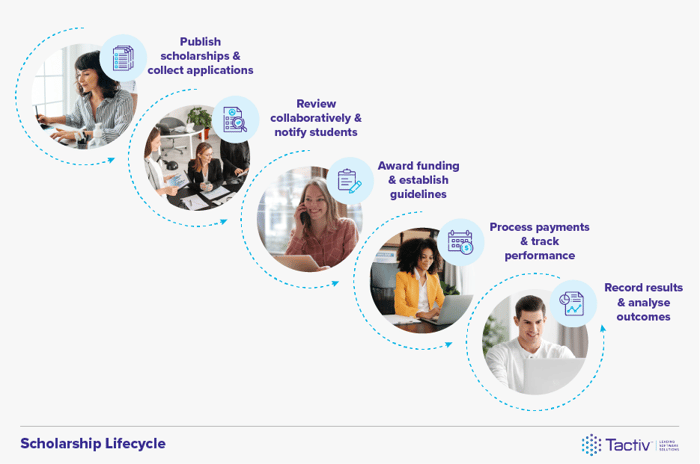
By now, the pattern should be clear: if your university needs stronger impact reporting, the software decision has to start earlier than the final dashboard. Scholarship offices should choose lifecycle software for grants and awards by mapping the full funding journey before comparing platforms. That means looking at how each stage of the funding journey connects before deciding which system is the best fit.
The stakes are not small. The ABS reported that Australian higher education organisations spent $16.4 billion on R&D in 2024, while the Australian Research Council defines research impact as the contribution research makes to the economy, society, environment or culture beyond academic research. For universities, that makes impact reporting a high-value governance and visibility exercise, not just an end-of-program admin task.
So before you compare vendors, start with these seven areas.
1. Map the full lifecycle
Start by mapping every stage your grant or scholarship program moves through, from application intake to impact reporting. This means looking beyond the obvious steps, such as collecting applications or assigning assessors. For a university, that may include:
- Application intake
- Eligibility screening
- Assessment and scoring
- Review panels
- Approvals
- Award setup
- Recipient communication
- Payments or milestones
- Acquittals
- Progress reporting
- Outcomes tracking
- Impact reporting
This step matters because most teams know their process informally, but that knowledge often sits with specific people or departments. Eligibility may sit with one team, assessor communication with another, payments with finance, and outcomes reporting somewhere else entirely.
Without a clear lifecycle map, software comparisons can become too shallow. A platform may look strong because it has a good application form or reporting dashboard, but still fall short on approvals, assessment criteria, milestone tracking or outcomes data.
Mapping the lifecycle helps your team compare software against the real work. It shows where data is created, where decisions happen, who needs access, and what needs to be captured for reporting later.
2. Identify where manual work creates risk
Manual steps are not always a problem. Scholarship and grant workflows often need human judgement, especially for eligibility reviews, assessments, panel decisions, and final approvals. The issue is where manual work makes the process harder to govern, repeat, or report on.
Risk may show up as:
- Delays between application review and approval
- Inconsistent scoring or assessment criteria across programs
- Duplicated data entry across spreadsheets and systems
- Missed applicant, assessor or recipient communications
- Version control issues across forms, documents or reports
- Approval decisions that are hard to trace later
- Reporting gaps at the end of a funding round
These issues become harder to manage as more faculties, assessors, funding streams or reporting requirements are added.
Identifying these risk points helps your team separate “nice to have” features from the capabilities the software genuinely needs. It also gives you a stronger basis for vendor conversations, because you can ask how each platform reduces the specific risks in your current process.
3. Define must-have workflows before demos
Mapping the lifecycle shows the broad journey your program moves through, from applications to outcomes. Defining workflows shows what the software needs to route, automate, capture or control along the way.
Here are some examples:
- Routing eligible applications to the right panel
- Applying program-specific scoring criteria
- Triggering approvals based on funding type or value
- Managing access by role or stakeholder group
- Capturing milestones, updates or reporting data at the right stage
This step helps you avoid being guided entirely by the vendor’s demo flow. A platform may look strong in a standard walkthrough, but the real test is whether it can support the way your grants, scholarships, awards and reporting processes actually work.
The clearer your must-have workflows are, the easier it becomes to compare platforms against real use cases rather than generic product claims.
4. Compare configurability and core features
This is where many software comparisons get tricky.
On paper, several platforms may appear to offer the same things: applications, assessments, approvals, reporting, dashboards and workflow automation. But for universities, the real test is not whether those features exist. It is whether they can flex around different programs without creating a new set of workarounds.
A donor-funded scholarship may need equity-based eligibility rules, a faculty review panel and recipient progress updates. A research grant may need milestone tracking, acquittals, project reporting and evidence of broader outcomes. An internal award may need a lighter assessment process but stronger executive visibility. If the software treats all of those workflows the same way, your team may still end up managing exceptions outside the system.
When comparing platforms, look closely at whether you can configure things like eligibility rules, scoring criteria, approval pathways, user permissions, communications, payment or milestone steps, and reporting views by program type.
Here’s a quick table listing what configurability should look like in practice:
|
Area to configure |
Why it matters |
What to check during demo |
|
Eligibility rules |
Different scholarships, grants and awards may have different criteria |
Can eligibility criteria and application pathways vary by program, cohort, faculty or funding stream? |
|
Assessment criteria |
Review processes often differ across programs |
Can scoring, weighting, qualitative feedback and reviewer access be configured separately? |
|
Approval workflows |
Some programs need faculty-level approval, others need central or executive sign-off |
Can approval steps, recommendations, notifications and task routing reflect your internal process? |
|
User permissions |
Assessors, administrators, finance and leadership need different views |
Can access be controlled by role, program or stage? |
|
Reporting views |
Different stakeholders need different levels of visibility |
Can dashboards and reports show program, cohort, faculty, outcome or funding-level views? |
|
Milestones, payments or acquittals |
Funding programs often need evidence beyond the award decision |
Can the system support milestone, payment, acquittal or progress-reporting steps where relevant? |
The best-fit system should give your team enough structure to keep processes consistent, but enough flexibility to reflect how different grants, scholarships and awards actually operate.
5. Define your reporting outputs before implementation
By this stage, you do not need another broad conversation about why reporting matters. You need to get specific about what the system should produce. Before choosing software, list the reports your team needs to create regularly and the data each one depends on. This might include internal dashboards, executive summaries, acquittal reports, donor updates, scholarship outcome reports, research impact summaries or portfolio-level funding reports.
The practical question is:
What information needs to be captured during the workflow so this report does not have to be rebuilt manually later?
For example, if leadership needs to see scholarship outcomes by cohort, the system needs to capture cohort data, award details and outcome updates in a consistent way. If the research office needs to report on milestones or acquittals, those fields need to be part of the workflow from the start.
This step helps your team avoid choosing software that looks strong in the final dashboard but does not capture the right information along the way.
Before shortlisting a platform, ask:
- What reports do we create every month, semester or funding round?
- Which reports currently require the most manual work?
- What data fields does each report depend on?
- Who needs to view, export or approve each report?
- Which outcomes need to be tracked over time?
- Can the platform report across programs, faculties, cohorts or funding streams?
6. Review implementation support
As you’ve seen in the previous sections, once you know what the system needs to manage, check how the vendor will help you turn that plan into a working setup. That is why implementation support matters.
Grant and scholarship management software is rarely a simple plug-and-play tool, especially when research offices, scholarship teams, assessors, finance, reporting teams and leadership all need to interact with the system in different ways.
When comparing platforms, look at how the vendor supports:
- Requirements mapping and process workshops
- Workflow configuration
- User roles and permissions
- Reporting setup
- User training
- Change management and stakeholder onboarding
- Support after launch
- Data migration, if this forms part of the implementation scope
The risk is not only choosing software that lacks the right capabilities. It is choosing software that can technically support your needs, but leaves your team to translate complex workflows into the system without enough guidance.
Strong implementation support should help your team turn the lifecycle you mapped earlier into a working setup. That includes deciding which workflows to configure first, who needs access, what reporting needs to be available from day one, and how different users will be trained to use the system confidently.
A useful demo question is:
What does your implementation process look like for a university managing multiple grants, scholarships, awards or funding programs?
The answer should make it clear what support your team receives after the sales process, not just what the platform can do in theory.
➔ Find out here what Tactiv's implementation process looks like
7. Consider long-term scale
By this point, you should have a clearer view of what the software needs to support on day one: your lifecycle, risk points, workflows, reporting needs and implementation requirements.
The final question is whether the platform can continue to work as your funding operations become more complex.
For universities, scale is rarely just about processing more applications. It can mean more faculties using the system, more funding types being added, more assessors involved, more reporting requirements, or more stakeholders needing visibility into program performance.
That is where narrow tools can start to lose their usefulness. A system may work well for one team, but become harder to manage if every new program needs its own workaround, spreadsheet, manual approval step or separate reporting process.
When comparing platforms, look for signs that the software can support. The goal is not to choose the most complex system available. It is to choose software that can become a shared operating layer for grant, scholarship and impact reporting workflows as they mature.
A better final test might be:
If your university’s funding operations became twice as complex in the next few years, would the platform create more clarity or more admin?
What types of grant and scholarship software should universities compare?
Before jumping into individual tools, our advice is to compare the type of software your university actually needs. That matters because the category can get crowded quickly. You may see application portals, research administration platforms, scholarship management systems, CRMs, project management tools and full lifecycle platforms all described as “grant management software".
But as we’ve covered, the right choice depends on what you need to manage: simple intake, research workflows, scholarship administration, reporting, outcomes tracking, or the full funding lifecycle.
A detailed tools list can help once you are ready to shortlist vendors. But before you get there, it helps to understand the main categories you are comparing.
|
Software type |
Best for |
Where it may fall short |
|
Application intake tools |
Collecting applications, forms and supporting documents |
May not support assessment, approvals, post-award workflows or outcomes reporting |
|
Research administration platforms |
Managing research grant processes, compliance and institutional research workflows |
May not always cover scholarship, awards or broader impact reporting needs |
|
Scholarship management platforms |
Managing scholarship applications, eligibility, recipient selection and award administration |
May not support complex research grant workflows, acquittals or multi-program reporting |
|
Generic CRM or project management tools |
Basic contact tracking, task management and team coordination |
Often need workarounds for eligibility, scoring, approvals, governance and lifecycle reporting |
|
Fit-for-purpose lifecycle platforms |
Managing grants, scholarships, approvals, reporting and outcomes across the full lifecycle |
Usually require more upfront process mapping, configuration and implementation planning |
The goal is not to find the tool with the longest feature list, but to choose the category that matches the problem you are solving. If your university only needs to collect applications, an intake tool may be enough. If your team needs to manage research grants, scholarships, approvals, reporting and outcomes across multiple programs, a fit-for-purpose lifecycle platform will usually be the better category to explore.
Once you know which category fits your needs, you can move into a more detailed vendor comparison with clearer criteria and fewer distractions.
How does Tactiv support grant and scholarship lifecycle management?
Picking the right software is tricky because the best choice depends on what your university actually needs to manage. A simple application tool may be enough for straightforward intake, but if your team needs to connect grants, scholarships, approvals, reporting and outcomes across multiple programs, it is worth looking at fit-for-purpose lifecycle software.
If you are already evaluating that kind of platform, Tactiv’s Enquire is designed to help organisations manage complex funding, grant, scholarship and program workflows in one place. It supports configurable processes across applications, assessments, approvals, stakeholder communication, reporting and outcomes tracking, so teams can manage the lifecycle behind the work, not just the final report.
To see what that could look like for your university, book a demo with us and we would love to show you around.
FAQs
What is grant and scholarship management software?
Grant and scholarship management software is a platform universities use to manage applications, eligibility, assessments, approvals, awards, reporting and outcomes tracking. It helps teams manage the full funding lifecycle instead of relying on spreadsheets, inboxes or disconnected systems.
What is scholarship lifecycle management?
Scholarship lifecycle management is the process of managing a scholarship from application intake through to eligibility checks, assessment, award administration, recipient communication, payments, reporting and outcomes tracking. It helps scholarship offices see how each stage connects rather than managing each step separately.
What is research grant management?
Research grant management is the process of administering research funding from application and assessment through to approvals, milestones, acquittals, reporting and outcomes. For universities, research grant management often involves research offices, assessors, finance teams, faculty stakeholders and reporting teams.
How does grant and scholarship management software support impact reporting?
Grant and scholarship management software supports impact reporting by capturing data and indicators throughout the funding lifecycle, and beyond. This makes it easier to connect applications, award decisions, milestones and outcomes when reporting on what a grant, scholarship or funding program achieved.
When should universities move beyond manual grant and scholarship processes?
Universities should move beyond manual grant and scholarship processes when applications, assessments, approvals, reporting or outcomes tracking become difficult to manage consistently. Manual tools can work for simple programs, but they often become harder to govern when multiple teams, faculties, funding streams or reporting requirements are involved.
What should universities look for in grant and scholarship management software?
Universities should look for grant and scholarship management software that supports lifecycle workflows, configurable assessments, approvals, stakeholder communication, reporting and outcomes tracking. The right platform should match the way the institution manages grants, scholarships, awards and impact reporting.
What is the difference between grant management software and scholarship management software?
Grant management software usually focuses on research or funding program workflows, including applications, assessments, milestones, acquittals and reporting. Scholarship management software usually focuses on scholarship applications, eligibility, recipient selection, award administration and recipient outcomes. Some universities may need lifecycle software that can support both.
What is cloud-based grant management software?
Cloud-based grant management software is grant management software that teams can access online rather than through local files or on-premise systems. It can help universities manage shared workflows, stakeholder access, reporting and program visibility across teams.
Is a CRM enough for university grant and scholarship management?
A CRM may be enough for basic contact tracking or simple workflow visibility, but it may not support the full grant and scholarship lifecycle. Universities should check whether the CRM can manage eligibility rules, assessments, approvals, acquittals, reporting and outcomes without heavy workarounds.
How should universities choose lifecycle software for grants and awards?
Universities should choose lifecycle software for grants and awards by mapping the full application-to-impact journey before comparing platforms. This helps teams assess whether the software can support applications, eligibility, assessments, approvals, awards, reporting and outcomes in one connected workflow.
Impact measurement health check
How well are you measuring your impact? Take our FREE 5-min health check to find out